

 Module DC-DC ,nguồn Công nghiệp Arduino
 Mạch PLC Arduino,mbed ,MCU Công nghiệp
 Thiết bị IOT ,Wifi công nghiệp
 Linh kiện cách ly Nguồn
 Bộ Vi sử lý và Vi Điều Khiển
 Kít Phát triển Vi Điều Khiển ARM
 Phụ kiện điện tử
 Linh kiện điện tử và IC chức năng
 IC Giao tiếp RS232 và RS485
 Máy tính công nghiệp
 Linh kiện ADC và DAC Công Nghiệp PLC
 Linh kiện IC Nguồn POWER

 Linh kiện MOSFET Và FET
 Linh kiện Transitor
địa chỉ :0000-9999 một thiết bị master có thể đọc và ghi địa chỉ này
địa chỉ :10000-19999 digital Input
địa chỉ :30000-39999 analog Input
địa chỉ :40000-49999 analog output
Chúng ta dùng ô nhớ 4X
Đầu tiên các bạn tải thư viện sau :https://github.com/emelianov/modbus-esp8266
Được viết cho cả ESP32 và ESP8266:
Chương trình như sau:
- Modbus TCP server for ESP8266/ESP32 and Ethernet library
/*
Modbus-Arduino Example - Master Modbus IP Client (ESP8266/ESP32)
Read Holding Register from Server device(c)2018 Alexander Emelianov (a.m.emelianov@gmail.com)
https://github.com/emelianov/modbus-esp8266
*/#ifdef ESP8266
#include <ESP8266WiFi.h>
#else
#include <WiFi.h>
#endif
#include <ModbusIP_ESP8266.h>const int REG = 1; // Modbus Hreg Offset
IPAddress local_IP(192, 168, 1, 20);
// Set your Gateway IP address
IPAddress gateway(192, 168, 1, 1);
IPAddress subnet(255, 255, 0, 0);
IPAddress primaryDNS(8, 8, 8, 8); //optional
IPAddress secondaryDNS(8, 8, 4, 4); //optional
const int LOOP_COUNT = 10;
long int mb_cnt=0;
long int i_cnt=0;
ModbusIP mb; //ModbusIP objectvoid setup() {
Serial.begin(115200);
if (!WiFi.config(local_IP, gateway, subnet, primaryDNS, secondaryDNS)) {
Serial.println("STA Failed to configure");
}
WiFi.begin("ID", "xxxxxxx");
while (WiFi.status() != WL_CONNECTED) {
delay(500);
Serial.print(".");
}
Serial.println("");
Serial.println("WiFi connected");
Serial.println("IP address: ");
Serial.println(WiFi.localIP());
for(i_cnt=0;i_cnt<64;i_cnt++)
{
mb.addHreg(i_cnt, 0);//Tao thanh ghi 2, FC03 040002
}
mb.client();
mb.begin();
}uint16_t res = 0;
uint8_t show = LOOP_COUNT;
long int cnt_mb=0;
long int cnt_step=0;
#define ST1 1000
#define ST2 2000
#define ST3 3000
void loop() {cnt_mb++;
cnt_step++;
switch(cnt_step)
{
case ST1: mb.Hreg(2, cnt_mb); break;
case ST2: mb.task();; break;
case ST3:cnt_step=0; break;
}
// mb.Ireg(2, 1);//Ghi gia tri 1 vao thanh ghi 030002}
Đầu tiên chúng ta kết nối đến WIFI và pass :WiFi.begin("ID", "xxxxxxx");
for(i_cnt=0;i_cnt<64;i_cnt++)
{
mb.addHreg(i_cnt, 0);//Tao thanh ghi 2, FC03 040002
}Hàm tạo 64 thanh ghi 4x 0-64
mb.client();
mb.begin();Khởi tạo cho phép kết nối modbus WIFI
Các bạn chọn như sau trên phần mền modbus polll:
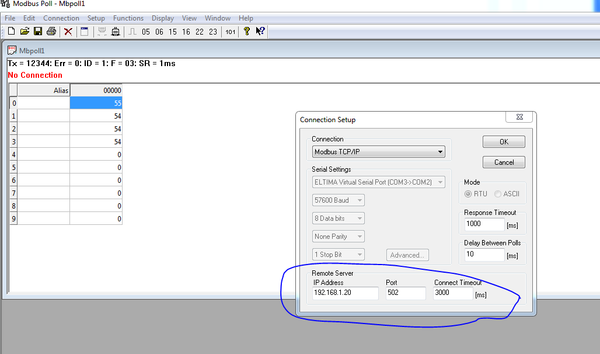
Chọn địa chỉ và port kết nối
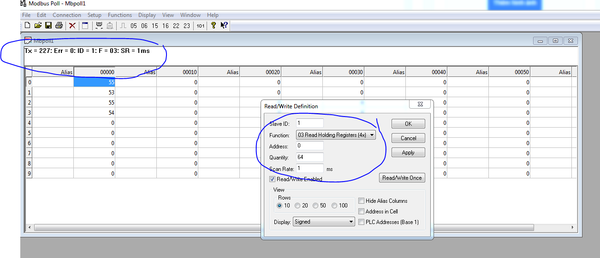
Tiếp theo kết nối thành công như sau:
Cảm ơn các bạn đã ghé thăm shop
